
The best Life360 alternative depends on why you're leaving. All-iPhone family? Apple's free Find My. Young kids who need content controls? FindMyKids ($16.99/year) or Google Family Link (free). Teens who feel surveilled, or a family drowning in alerts? An ETA-first app like Lighthouse (six months free with an annual plan, then $79.99/year for the whole circle). Only switching to save money? Check Life360's free tier first. It might be enough.
Most "best alternatives" lists are written by whichever app publishes them, and every list crowns its author #1. We make Lighthouse, so read our take knowing that. In exchange, we'll tell you plainly who each app is for, what each one costs as of September 2026, and which families should stay on Life360.
First: what do you want to change?
Use four questions to narrow the alternatives:
- Notification fit. Do you want fewer alerts or different alert controls?
- Battery use. Do you want a lighter workflow than continuous background location?
- Price. Life360's free tier gives you 2 days of history and 2 place alerts. The features people actually want (emergency dispatch, roadside assistance, unlimited alerts) start at Gold, $16.99/month.
- Family agreement. Would a mutual, arrival-focused system better match the boundaries your family agrees to?
Your reason picks your alternative. Someone leaving over price needs different advice than someone whose teen deleted the app.
The alternatives
Apple Find My and Maps: best free option for iPhone families
Find My is built into iPhone and supports ongoing location sharing. Apple also lets people set arrival or departure notifications in Find My, while Apple Maps can share a live ETA during navigation.
What you give up is a cross-platform family circle and one screen centered on everyone's arrival status. Notifications are configured person by person, and Android family members are outside the Apple workflow. If your whole family is on iPhone and does not mind that setup, start here.
Google Maps location sharing: best free option for mixed phones
Works on iPhone and Android and shares live location with selected people.
Like Find My, it is organized around individual sharing relationships rather than a family circle. Google Maps supports trip-progress ETA sharing and configurable arrival or departure notifications, but setup is person by person and some account types are not eligible.
FindMyKids: best for kids under 13, and the cheapest paid option here
Built for the young-kid stage: a child app (or GPS watch), school-day tracking, and listening features. Premium runs $2.99/month for one device, $16.99/year for up to three, or a $25.99 one-time lifetime license, which nothing else in this category offers.
That parent-watches-child model is exactly what parents of young kids want, and exactly what teens reject. If your kids are 13+, this is the wrong tool at any price.
Google Family Link: best if the real problem is screen time
Free, and manages the whole phone for under-13s: apps, purchases, screen time, plus basic location. Kids age out of it at 13, which is when many parents go looking for what's next. (More on that in our family tracking apps roundup.)
GeoZilla: a similar feature category with variable offers
GeoZilla covers a similar category: places, alerts, driving reports, and a paid subscription. Its available price can vary by storefront, term, and promotion, so compare the renewal amount shown at checkout rather than a temporary discount banner. If your goal is a substantially simpler product, a close feature substitute may not solve it.
Lighthouse: best for families who want ETAs, not more alerts
Ours, so judge accordingly.
Lighthouse is built by MapQuest around one idea: the question families actually ask isn't "where's the dot?" It's "when do they arrive?" So that's the whole product:
- Live ETAs for everyone in your circle
- One-tap "On My Way" alerts
- Automatic arrival notifications at saved places
- Low-battery warnings, so a dead phone doesn't cause panic
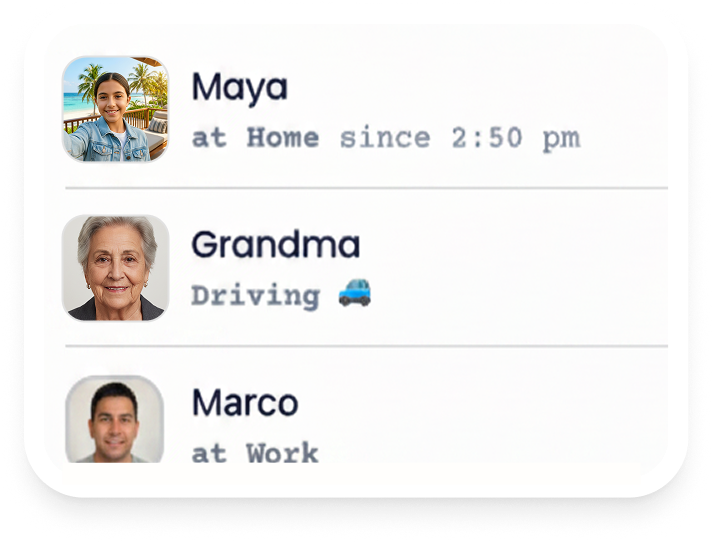
Everyone in a Lighthouse circle shares mutually, so the product is designed as a family coordination tool rather than one-way monitoring. Whether that works for a teen still depends on an open agreement and age-appropriate parent or guardian involvement. Choose the annual plan to get six months free; after the trial it renews at $79.99/year unless canceled. A $9.99 monthly plan is also available, and one subscription covers the whole circle. Offer eligibility and terms are shown in the App Store.
What it doesn't do: content filtering, screen time, driving scores, or under-13 monitoring. If you need those, use Family Link or FindMyKids instead.
Side by side (prices checked September 2026)
| App | Price | ETAs | Arrival alerts | Cross-platform | Best for |
|---|---|---|---|---|---|
| Find My + Apple Maps | Included with iPhone | Yes, per trip | Yes, configurable | iPhone-centered | All-iPhone families |
| Google Maps | Free | Yes, per trip | Yes, configurable | Yes | Free cross-platform sharing |
| FindMyKids | $16.99/yr (3 devices) | No | Yes | Yes | Kids under 13 |
| Family Link | Free | No | No | Yes | Screen-time management |
| GeoZilla | Varies by storefront, term, and offer | No | Yes | Yes | Life360-style features |
| Lighthouse | 6 months free with annual plan, then $79.99/yr; $9.99/mo | Yes | Yes, automatic | iOS | Teens 13+, ETA-first families |
| Life360 | Free tier; Gold $16.99/mo | Limited | Yes | Yes | Biggest all-in-one bundle |
Feature references: Apple's location-sharing guide, Apple's ETA guide, and Google Maps location-sharing help. Availability can vary by device, operating-system version, account type, and country.
Who should stay on Life360
Honesty cuts both ways. Stay if:
- You actively use crash detection or roadside assistance. Gold bundles both for $16.99/month, and no alternative on this list matches that combination.
- Your family is large, cross-platform, and already trained on it.
- The free tier covers you and price was your only complaint. Two days of history and two place alerts is enough for some families, and $0 beats every option here.
Before you switch
Half-migrated families end up with two apps and no answers. Do it deliberately:
- Get everyone on the new app the same week. Delete the old one together.
- Set up saved places (home, school, work) on day one.
- Agree on the rules out loud. Our location-sharing agreement is a ready-made starting point.
- Learn the failure states before you need them. Why locations stop updating is the most common panic, and it's almost never what it looks like.