The best family location-sharing app depends on your phones, your children's ages, and the job you need it to do. All-iPhone family: Apple Find My (free). Mixed phones: Google Maps sharing (free). Younger children who need device supervision: Google Family Link (free) or FindMyKids. Families with members 13+: Lighthouse (six months free with an annual plan, then $79.99/year for the whole circle), if ETAs and arrival alerts matter most. Life360 remains the biggest paid all-in-one bundle at $16.99/month for Gold.
One reframe before the list. The good versions of these apps aren't really "tracking" apps. They're location sharing with consent: everyone opts in, everyone can see and be seen. Apps that promise to secretly track a phone are a different category with real legal and trust problems, and none of them are in this guide.
The quick answer (prices checked September 2026)
| App | Price | Platforms | ETAs | Arrival alerts | Best for |
|---|---|---|---|---|---|
| Apple Find My + Maps | Included with iPhone | iPhone | Yes, per trip in Maps | Yes, configurable | All-iPhone families |
| Google Maps sharing | Free | iPhone and Android | Yes, per trip | Yes, configurable | Free cross-platform basics |
| Google Family Link | Free | Both | No | No | Under-13 phone management |
| FindMyKids | $2.99/mo or $16.99/yr | Both | No | Yes | Young kids, GPS watches |
| Lighthouse | 6 months free with annual plan, then $79.99/yr; $9.99/mo | iOS | Yes | Yes, automatic | Teens 13+, arrival-focused |
| Life360 | Free tier; $9.99 to $24.99/mo paid | Both | Limited | Yes | Biggest paid bundle |
Plan structures differ: Life360 and Lighthouse cover members in a family circle, while FindMyKids pricing varies by device count and term. Sources: Life360's plans page and FindMyKids; prices were checked September 2, 2026. Feature instructions come from Apple's location-sharing guide and Google Maps Help.
Best free: Find My or Google Maps
If you've never used a family location app, start free.
Find My is built into iPhone. It supports ongoing location sharing and configurable arrival or departure notifications. Apple Maps separately supports live ETA sharing while navigating, including automatic sharing with a chosen contact for a pinned place. The main limit is platform fit: this is an Apple-centered setup rather than a mixed-phone family circle.
Google Maps location sharing works on iPhone and Android. It's person-to-person rather than circle-based, so a family of five means several sharing relationships. Google also supports up to five arrival or departure notifications per person when the eligibility requirements are met, and trip-progress sharing includes a live ETA.
Free tools can answer both location and arrival questions. Dedicated family apps mainly reduce setup friction by organizing those capabilities around a persistent family group.
Best for kids under 13: Family Link or FindMyKids
Both use the parent-manages-child model, which is right for young kids.
- Family Link (free) manages apps, purchases, screen time, and location for supervised Google accounts. It is the device-management choice in this list, not simply a shared map.
- FindMyKids ($2.99/month for one device, $16.99/year for three, or a $25.99 lifetime license) is location-first, with school-day features and GPS-watch support for kids too young for a phone. The lifetime option makes it the cheapest paid app in the category by a wide margin.
Plan for the expiration date. Around 13, supervision models start failing socially even when they still work technically. That's the gap the next pick fills.
Best for teens: Lighthouse
We build Lighthouse, so this is the opinionated pick. Here's the reasoning.
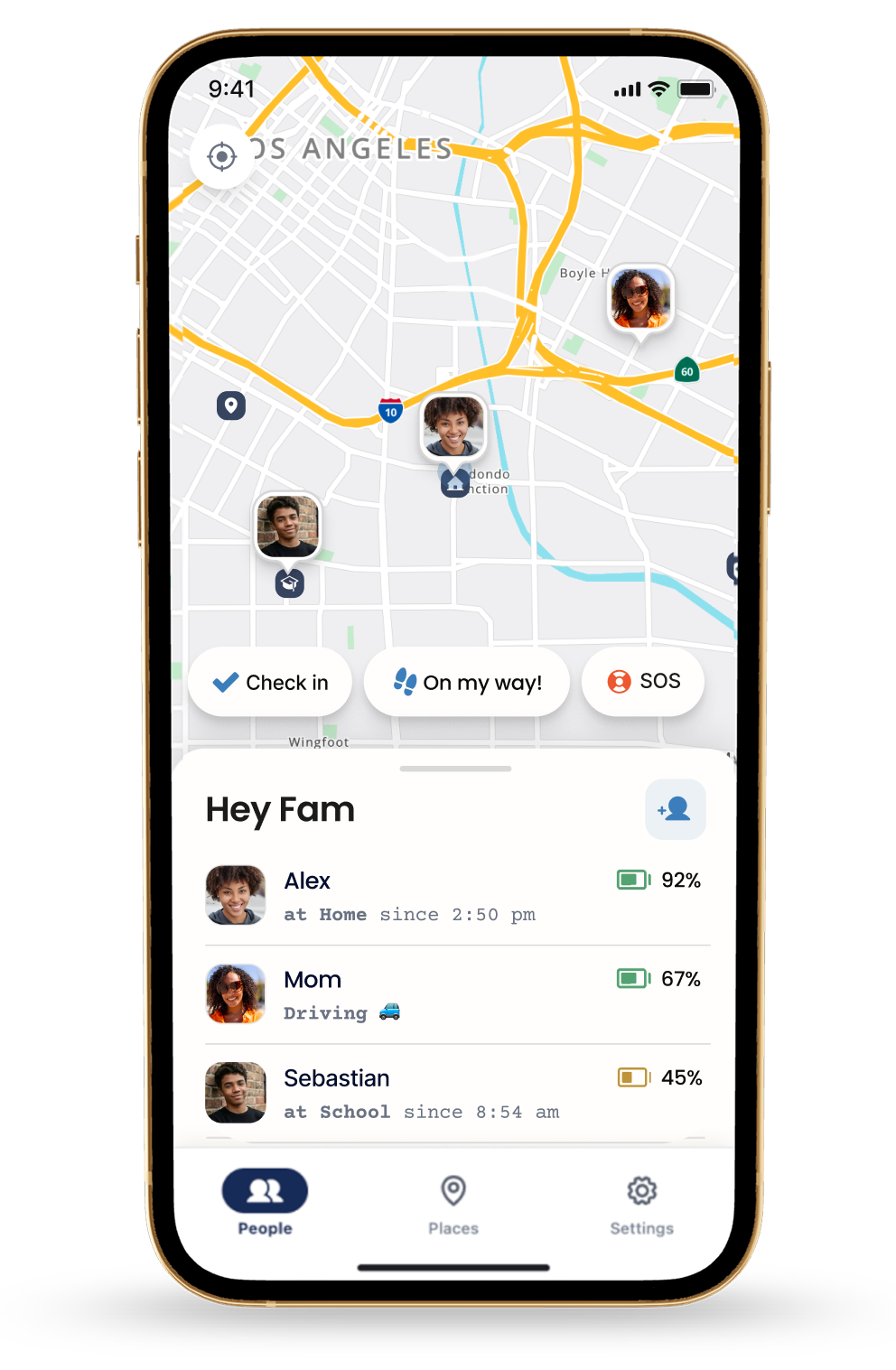
For families with members 13 and up, the honest job of a family app is coordination, not control. The real questions are "did she make it to school" and "when's he home for dinner." Lighthouse, made by MapQuest, is designed around exactly those:
- Live ETAs for your circle: when someone arrives, not just where they are
- One-tap "On My Way": heading home, tap once, everyone sees your ETA
- Automatic arrival alerts: the "text me when you get there" text, retired
- Low-battery alerts: useful context before a phone stops reporting
- Mutual sharing: everyone sees everyone, which is why teens keep it installed
Choose the annual plan to get six months free; after the trial it renews at $79.99/year unless canceled. A $9.99 monthly plan is also available. One person subscribes and the whole circle is in. Offer eligibility and terms are shown in the App Store. What it doesn't do: content filters, screen time, driving scores, or under-13 monitoring.
Best all-in-one: Life360
Life360 is the category giant, and for some families it's the right call. Gold ($16.99/month) bundles crash detection with emergency dispatch, 24/7 roadside assistance, unlimited place alerts, and driver reports, on both platforms. Platinum ($24.99/month) adds towing and stolen-funds coverage. There is also a continuing $0 tier with two days of location history and two Place Alerts.
The trade-offs are the famous ones: notification volume, battery, and teens who resent the driving reports. We wrote a full guide to when to stay and when to leave, plus a head-to-head with Verizon Smart Family if you're weighing your carrier's bundle.
What we left out
Apps that promise to track any phone by number, monitor someone secretly, or "catch" a partner. They mostly don't work as advertised, and covertly tracking another adult has real legal exposure. If an app hides who gets notified about the tracking, treat that as a red flag for everything else it claims.
Three setup rules, whatever you pick
- Everyone shares, including parents. One-directional tracking is where family apps go to die. Our location-sharing agreement puts the rules in writing in ten minutes.
- Save your places on day one. Home, school, work. Arrival automation is the entire payoff, and it doesn't work without saved places.
- Learn what a stale location means before the first scare. Check battery, signal, permissions, and settings first before inferring why an update stopped.